Showing posts with label Blogger seo. Show all posts

Blogger Seo: Seo Benefits of Breadcrumbs in Blogger

Hello every one. This is number 12 post of our blog. We have already published 11 important posts. We always try to give a good concept about blogger seo. You send us mail a lot. You have thanked us via email. We are really very happy to receive your email. Hope by reading our posts regularly you will get a good concept about blogger seo. You can subscribe us to get update regularly.

Blogger seo,blogspot seo,seo blogger,seo blogspot,add breadcrumbs in blogger,seo benefit of breadcrumbs

Our this tutorial is about importance of breadcrumbs and how to add breadcrumbs in blogger.

Importance of Breadcrumbs:
Breadcrumbs is important not only for blogger seo or blgospot site but also for all kind of blog or sites. [See image below]

This is a google Cached page of this blog's post. Google has highlighted the keyword from this page/post. See the breadcrumbs.  Google has also highlighted to keyword which is in breadcrumbs. That means keyword of breadcrumbs is getting value from google like other keywords of the post/page. Also it is building internal link. It helps to decrease your sites bounce rate. Let make a list.

  • Increase keyword value to search engine.
  • Build Internal Link.
  • Decrease site's bounce rate.
  • It shows label/category which make site user friendly.
  • More....
See this tutorial to add breadcrumbs in your site or blog.

How to add Breadcrumbs in wordpress thesis theme.

Feel free to express your opinion. Comment box is open for all. Please avoid SPAM.
Thanks

You may like:

Blogger Seo: Social Sharing Widget in Blogger (SMM)

Social Sharing Widget in Blogger

Social media is an important source of traffic. You may get huge visitors from social networking site. Social media marketing (SMM) has a great value to get visitors. I have many blog. One of my blog get 35,000 visitors daily. 7,000-10,000 visitors from are arriving from social networking sites. So, social media marketing and search engine optimization is equal important to me.

Blogger seo,blogspot seo,seo blogger,seo blogspot,how to add sharing button in blogger,social sharing button in blogger


In this tutorial I will show you how to add social sharing widget in blogger.

Importance of social sharing widget:
Firs of all I will give you a simple example so that you become clear about importance of it.
Suppose, you have a blog and I am a visitor of your blog. I have found an awesome article in you blog. I have a Facebook ID with 3,000 friends and followers  If I share this in Facebook all of my friends will see this. If some of them also share this link to their profile then their friend will also see this. Thus you may get traffic.

AddThis is a popular company which gives social sharing button free. You can easily get code form their site. No need to registration. Follow instruction below:
  • Go to addThis.
  • Click on Get Start.
  • Chose an style from their list.
  • After selecting style you will get a code. Code will show right side.
  • Copy the code.
  • Then LogIn to your blogger account.
  • Go to Layout and Click on Add an gadget.
  • Select HTML/JavaScript.
  • Put your copied code here and save.
If you face any problem please feel free to share with us. Thanks

How to add Social Sharing Button in Blogger after every post. (Upcoming)
How to add Social Sharing Button in Blogger before every post. (Upcoming)

Blogger seo: Seo friendly post title for blogger

Post title is a very important fact for your blog. Now a days meta-keyword tag is getting less importance to search engines. Title is getting much importance. So you should be very careful to use it properly. It is not only for blogger seo / blogger blog but also for all kind of blog.

Seo friendly post title for blogger,seo friendly title,how to make title seo friendly,importance of title,seo friendly post title

An attractive title attract visitors and also attract search engines. It carries a gist of your site or post. When you will write about something think about it's title.You should think which type of  title will attract visitors.

You must give your targeted keyword into title. But never make title too large and complex. Try to keep it normal,clear,attractive,informative and acceptable. Never use false title because it may increase site's bounce rate.
Seo friendly post title for blogger,seo friendly title,how to make title seo friendly,importance of title,seo friendly post title
See the image carefully. I have searched by a keyword. My keywords is in post title. That is why google is showing this site's post.

This is very effective way to get good result in search ranking. So, always try to keep your targeted keyword into your post's title.
Do not make your post's title extra large. Keep is short,smart,informative and seo friendly. So that your posts become attractive to search engines and visitors. Also try to make your post seo friendly. 

I will write a post about: How to write seo friendly post in blogger.
Bye now!


You may like this:

Blogger Seo: How to setup blogger Custom robots header tags

How to setup blogger Custom robots header tags

This is an important tutorial for blogger seo. In new interface of blogger google has added a new crawlers and indexing function. As you can not add robot.txt file in blogger blog so google has added this function. You have to be careful to setup this. If you do something wrong then google may not index your post. We have already shown you how to setup Custom robots.txt in blogger. Now we are going to see how to setup blogger Custom robots header tags.
  • Go to Blogger.com
  • LogIn to your account.
  • From control panel click on Settings.
  • Then click on Search Preferences.
  • Right side you will see Custom robots header tags.
  • Click on Edit>Yes.
  • Now setup your settings like image below.

Blogger seo: Using post description in blogger

Hello buddy. Welcome to another blogger seo tutorial. :D
I am back again here. I am really busy for my study. Sorry for posting late. All you know what I write here is just from my personal experience. I have already told you in my previous post that I am not seo expert. So, please inform me if you find anything wrong here.
Today I am writing about using post description. Do you know, how to add description into a post in blogger? Don't worry! Here it is. :)

Using post description in blogger,how to use description in post, how to set post description,how to use description in a post in blogger,importance of post description

Using post description in blogger

Suppose, you will read a story. You don't know how it is. But, if you get a short description of that story you will decide to read or not. Same thing here. Search engine shows description of your site and post in it's search result. See screenshot below.
Using post description in blogger,how to use description in post, how to set post description,how to use description in a post in blogger,importance of post description

If a visitor see your site in search result and get a good idea about your post reading description then he will decide to visit your site or not. It is a way to attract visitors. But most important thing is, it has an important role in seo. It has a great value to search engines. Search engine will show your site if it find keyword into your description. So, post title and post description is equal important to me.
Blogger has added a function to add post's description into their new interface. It was not in old interface of blogger.

How to add post description in blogger:


  • Create a new post.
  • Give a nice title.
  • Write post.
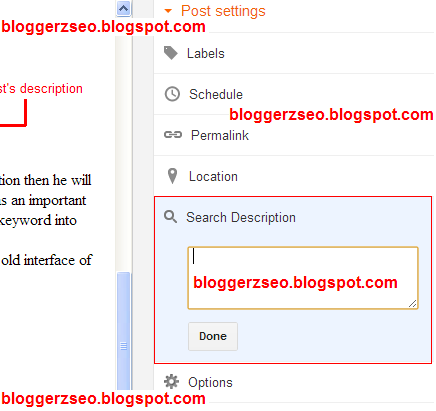
  • Right side you will see Search Description.
  • Click on it. A text area will open.
  • Write a short description of your post.
  • Then Click Done.
  • See image below...
Using post description in blogger,how to use description in post, how to set post description,how to use description in a post in blogger,importance of post description
This is not only for blogger but also for wordpress and all other blog. Only adding system is different.

Blogger Seo: Submit sitemap in Bing for Blogger

Blogger Seo: Submit sitemap in Bing for Blogger

My previous post was about Blogger sitemap submition in Google webmaster tool. Click here to see the post. Today I'm going to write about Blogger sitemap submition in Bing. Bing is another popular search engine. You can get a good ammount of visitor from here.
blogger seo,submit sitemap in bing for blogger,blogger sitemap submit in bing, how to submit blogger sitemap in bing,submit blogger sitemap in bing.

Now, Follow these steps:
  • Go to here. (http://www.bing.com/toolbox/webmaster/)
  • SignIn here. If you already have any Bing or Microsoft account, you can login by it. If you don't then SignUp.
  • Here in Add site field put your site url and click on Add.
  • A new page will open. No need to change. Again click on Add.
  • Then you can see you site there. Click on Verify Now. See image below.
blogger seo,submit sitemap in bing for blogger,blogger sitemap submit in bing, how to submit blogger sitemap in bing,submit blogger sitemap in bing.
  • Copy meta tag. See screenshot below.
blogger seo,submit sitemap in bing for blogger,blogger sitemap submit in bing, how to submit blogger sitemap in bing,submit blogger sitemap in bing.
  • LogIN to your blogger account.
  • Go to Template>Edit HTML>Proceed.
  • Find <head>. Now, paste the code just after this. See the image below.
blogger seo,submit sitemap in bing for blogger,blogger sitemap submit in bing, how to submit blogger sitemap in bing,submit blogger sitemap in bing.
  • Save template.
  • Now, Click on VERIFY.
After verifying successfully your Dashboard will open. Click on SUBMIT A SITEMAP. See image below.
blogger seo,submit sitemap in bing for blogger,blogger sitemap submit in bing, how to submit blogger sitemap in bing,submit blogger sitemap in bing.
A text box will open. Write there: http://your-site.blogspot.com/sitemap.xml and click SUBMIT.

Ok. You have successfully submited blogger sitemap in bing. within a week it will be approved.

Thanks.

You may like this:

Blogger Seo: Submit sitemap in google for Blogger

Sitemap is an important matter for seo. It is important not only for blogger but also for all kind of seo. Sitemap helps you to submit and index your new posts. When you will add a sitemap in google webmaster tool it gives your site's information to google webmaster tool. After adding a sitemap for your site google will show your total post number and within 1-3days google will approve it and will index your posts.
submit sitemap in google for blogger,blogger sitemap submit, flobber sitemap.xml,sitemap submit for blogspot in google,blogspot sitemap submit,blogger sitemap in google
Blogger blog's sitemap submition is different from others. Other have to create a sitemap.xml file first. But blogger user's have no need to create any sitemap.

Lets see how to add blogger sitemap in google:

  • Go to google webmaster tool. (Here).
  • LogIN with your gmail account which you have used in Blogger.
  • After loging in you will see your blogger site here.
  • Click on it.
  • Then right side you will see sitemap option. Click there.
  • You will see Add sitemap button. Click on it.
  • A box will open like image below.

submit sitemap in google for blogger,blogger sitemap submit, flobber sitemap.xml,sitemap submit for blogspot in google,blogspot sitemap submit,blogger sitemap in google
  • Type sitemap.xml and click on Submit Sitemap.
  • Then refresh you page.
  • Submiting complete.
After submiting a page like image below will see.
submit sitemap in google for blogger,blogger sitemap submit, flobber sitemap.xml,sitemap submit for blogspot in google,blogspot sitemap submit,blogger sitemap in google

See image above. Sitemap is under pending. Google will approve it quickly. When I have submited my sitemap then I had total 5posts in by blog. So, here status is showing 5 Submitted.

It is the fact. Hope you have understood that.
Bye today.

Blogger SEO: Internal Link Building in Blog Post

Welcome to another tutorial of Blogger SEO. Our previous post was about Image alt tag. Today we are going to know about importance of Internal Link Building. Not only for blogger seo also for all tyep of blog or website Internal Link Building is important.
bloger seo,blogspot seo,internal link building,internal link building in blogger,link building,seo for blogger
Internal link building means linking inside your web or blog. It sometimes looks like related post. In this post you have seen above that some of our texts are linked with other category or post (Blogger SEO, Image alt tag). These are called internal link building.

It helps your website to get visitors. It minimizes your bounce rate. When a visitor will come to your site he will click related topic's link if he find. Thus bounce rate can't increase.

For Example:
Suppose, you have come to my blog to know about Blogger SEO. Somehow you have found this post. After reading this post hope you will want to see other of our posts about Blogger SEO. So, you will click on my given internal link above. Thus, my bounce rate will minimize.

After this post I have menually given related posts link. It is also a trick of Internal Link Building.

Also it makes you visitors your site friendly. Easy access to other post visitors will easily find and must like your blog. It will give you some permanent visitors. Thay will return to your site for next post or update.

So, You think about importance of this. Hope you will like this and apply.

Our next post will be published soon. Till then bye...

[Please comment for any Problem]

You may like this:

Blogger SEO: Custom robots.txt for blogger | Crawlers and indexing

Hello everybody. How are you all. Now I am going to show you How to Setup Custom robots.txt in Blogger.
custom robots.txt for blogger, how to set custom robots.txt for blogger, blogger crawlers and indexing setup, how to setup blogger crawlers and indexing setup
It is a function of blogger new interface. It is helpful for SEO. In self hosted website we create an extra robot.txt file and put code in it. In old interface this feature was not available. Now google has given this feature.
Lets see how can I do this:

  • Go to Blogger and LogIn to your acount.
  • Choose your blog.
  • Click Settings.
  • Here you will find Search Preferences. Click on it.
  • In Crawlers and indexing You will see Custom robots.txt
  • Now click Edit and Select Yes.
  • A new text area will come. Put this code in it.
User-agent: Mediapartners-Google
Disallow: 
User-agent: *
Disallow: /search?q=*
Disallow: /*?updated-max=*
Allow: /

Sitemap: http://www.bloggerzseo.blogspot.com/feeds/posts/default?orderby=updated
  • You just Change Sitemap by your own.
  • After that click Save changes.
Congrats!! You have done it. :)

PLEASE COMMENT FOR PROBLEM OR HELP

Blogger SEO: Use Image alt Tag in Post or Page


Hello everyone. Welcome to another tutorial of Blogger SEO. This is an important tutorial. Image alt tag is importan for using your keyword or alt text. It helps to index your image in google or other search engine.
Blogger SEO, use image alt tag,how to use image alt tag, img alt tag, image seo, index image, how to index image,blogspot seo
Image alt tag is an important part of Blogger SEO.Do you know google will not index you image if you do not use image alt tag. So,it is important for your site traffic. Now I will show you, How to use Image alt tag in blogger post or page. I will write for new interface of blogger. So, I will recommend you to use new interface of blogger. Let's see:

  • LogIn to your Blogger.
  • Click on new post or page and write what you want.
  • Now Insert any image where you need.
  • When image will insert into your post click on the image.
  • Then click on Properties. See screenshot below.
Blogger SEO, use image alt tag,how to use image alt tag, img alt tag, image seo, index image, how to index image,blogspot seo
Click on image for large view
  • A new box will come with two text field. See screenshot below.
Blogger SEO, use image alt tag,how to use image alt tag, img alt tag, image seo, index image, how to index image,blogspot seo
  • As a trick you just fill those field with your post keyword.
  • And click on ok.
After completing your post publish it and open your post from blog. Now in your post or page put your mouse pointer on you image then you will see your given keyword in balone. You image alt tag is complete.
Ok. You have successfully done this. Hope it will be helpful for you.

[Please Comment For Any Problem]
These may help you also:

  • Blogger SEO: Custom robots.txt for blogger | Crawlers and indexing
  • Make your blogger template/theme search engine (SEO) friendly

Blogger SEO: SetUp Blogger Post Title | Fix Blogger Seo Friendly Post Title


Title tag is an important element for of page seo. You should make you title seo friendly for good result. Maximum blogger template's default title system is not fully seo friendly. When you will show any blogger post just notice on browser title bar. You are showing only post title. But seo friendly title means Post Title With Site Title. It always carry your site anywhere in your site. So it is important for Blogger seo. Not only for Blogger seo but also for any kind of seo.

Now lets see how to fix Blogger Post title:
  • LogIN to your Blogger account.
  • Click on Template.
  • Then Edit HTML.
  • Proceed.
  • Click on Expand Widget Templates.
Now find this code:  <title><data:blog.pageTitle/></title>
Just remove it and replace with this code:

<!--bloggerzseo.blogspot.com--><b:if cond='data:blog.pageType == &quot;item&quot;'><title><data:blog.pageName/></title><b:else/><title><data:blog.pageTitle/></title></b:if><!--bloggerzseo.blogspot.com-->

Save Template.

Blogger SEO: Make your blogger template/theme search engine (SEO) friendly

SEO is very important for your website or blog. When you will create a blog by BLOGGER I will tell you to make it SEO friendly. Templates may be SEO friendly or not. Some templates are SEO friendly. If your templates is not SEO friendly then lets make it SEO friendly.
seo friendly blogger templates,make blogger template seo friendly,use meta tag on blogger,blogger seo,make blogspot seo friendly,make blogger seo friendly

Do it step by step:
 [I will show it here in new blogger interface]
01. Go to blogger and LogIn to your account and select your Blog.
02. Click on Template (Left side).
03. Then Click Edit Html.
04. Now Click on proceed.
05. Find and Select code from <b:include data=’blog’ name=’all-head-content’/> to <b:skin><![CDATA[/*

See image:
make template seo friendly,seo friendly blogger templates,make blogger template seo friendly,use meta tag on blogger


06. Replace selected code by this code: 

<b:include data='blog' name='all-head-content'/>
<b:if cond='data:blog.url == data:blog.homepageUrl'>
<meta content=
'Write Your Blog Description Here' name='description'/>
<meta content=
'Write Your Blog Keywords Here' name='keywords'/>
<meta content='index, follow' name='robots'/>
<meta content=
'Write Your Name Here' name='author'/>
<meta content=
'Write Your Blog Language Here' name='language'/>
<meta content=
'Write Your Country Name Here' name='country'/>
</b:if>

<!-- Start 
www.hitbangla.com: Changing the Blogger Title Tag -->
<b:if cond='data:blog.pageType == &quot;index&quot;'>
<title><data:blog.pageTitle/></title> 
<b:else/>
<title><data:blog.pageName/> ~ <data:blog.title/></title>
</b:if>
<!-- End 
www.hitbangla.com: Changing the Blogger Title Tag -->

<link href='Write Your Favicon URL' rel='shortcut icon' type='image/vnd.microsoft.icon'/>

<b:skin><![CDATA[/*


make template seo friendly,seo friendly blogger templates,make blogger template seo friendly,use meta tag on blogger

Which you have to change now:

01. Write your own blog description instead "Write your blog description here". Use 150-200 character max. 
02. Write your own blog keyword instead "Write Your Blog Keyword Here". Use comma (,) after each keyword.
03. Write your name instead "Write Your Name Here".
04. Write your blog language's short form instead "Write Your Blog Language Here". Example: For  English use "EN".
05. Write your country's short form instead "Write Your Country Name Here". Example: For  Bangladesh use "BD".

Now Save your Template.
N.B: If you do this you have no need to fix title code.
[Please Comment for any problem]
These may help you also:


Designed By Cash Loans Payday | Proudly Powered by Blogger